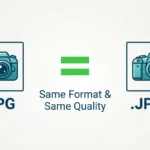
JPG and JPEG are two different file extensions for the exact same digital image format, meaning there is no difference in image quality, file size, or compatibility between them.
Have you ever saved a photo on your computer or uploaded a picture to a website and wondered whether you should choose JPG or JPEG? Because these two file extensions look slightly different, many people assume one offers better picture quality or smaller file sizes than the other. However, changing a file’s extension from .jpg to .jpeg does not alter the image in any way. In this guide, you will learn why both names exist, the historical reason behind the missing letter “E,” how modern operating systems handle both file types, and practical tips for using them with complete confidence.
What Does JPEG Mean?
The acronym JPEG stands for Joint Photographic Experts Group. This is the name of the committee of digital imaging experts that created the standard image format back in 1992.
JPEG is a popular digital image format used for storing and transmitting digital photos on the internet. It uses a compression process that reduces file size without making pictures look blurry or pixelated to the human eye.
- Full Format Name: Joint Photographic Experts Group
- File Extension: .jpeg
- Pronunciation: “JAY-peg”
- Common Use: Digital photography, website graphics, and email attachments
When you capture a photo with a smartphone or digital camera, the image file is usually saved as a JPEG because it balances high picture detail with manageable storage size.
What Does JPG Mean?
The file extension JPG is simply a shortened three-letter version of JPEG. It represents the exact same underlying file format, structure, and image data.
- Abbreviated Format Name: JPG
- File Extension: .jpg
- Pronunciation: “JAY-peg” (pronounced identically to JPEG)
- Common Use: Web photos, social media uploads, and online document attachments
Because both .jpg and .jpeg refer to the exact same file format, an image named photo.jpg and an image named photo.jpeg are functionally identical.
Why Are There Two Different Names?
The existence of both .jpg and .jpeg comes down to an old technical limitation in early computer operating systems rather than a difference in image quality.
The Old 8.3 Filename Rule (MS-DOS and Early Windows)
In the early days of personal computing, operating systems like MS-DOS and Windows 3.1 enforced a strict rule called the “8.3 filename limit.” This rule required every file name to have two parts:
- Up to 8 characters for the file name.
- Exactly 3 characters for the file extension after the dot.
Because early Windows systems could not support a four-letter extension like .jpeg, software developers shortened the extension to three letters: .jpg.
Mac and Unix Systems
At the same time, Macintosh (Mac) and Unix operating systems did not have a three-letter limit for file extensions. Mac users could easily save and open files with the full four-letter extension .jpeg.
As a result, PC users grew accustomed to seeing .jpg, while Mac users frequently saw .jpeg.
Modern Operating Systems Today
Today, modern operating systems like Windows 10, Windows 11, macOS, iOS, Android, and Linux support file extensions of any length. Both .jpg and .jpeg are recognized universally across almost every modern device, web browser, photo viewer, and image editing application.
Are JPG and JPEG Images Different in Quality?
No. There is zero difference in image quality between a .jpg file and a .jpeg file.
- Image Compression: Both use the exact same lossy compression algorithms.
- Color Depth: Both support up to 16.7 million colors (24-bit color).
- File Size: Renaming
image.jpgtoimage.jpegdoes not add or subtract a single byte of data. - Editing Support: Every photo editor—including Photoshop, Canva, GIMP, and mobile photo apps—treats both extensions identically.
If you change the file extension from .jpg to .jpeg (or vice versa), the photo will open without any issues because the internal file data remains unchanged.
Comparison Table
|
| Feature | JPG (.jpg) | JPEG (.jpeg) | Are They Different? |
| Full Name | Joint Photographic Experts Group | Joint Photographic Experts Group | No (Same format) |
| Pronunciation | “JAY-peg” | “JAY-peg” | No (Identical) |
| Historical Origin | Created for MS-DOS / 3-letter limit | Original 4-letter extension | Yes (Historical only) |
| Image Quality | Identical compression and color | Identical compression and color | No (100% equal) |
| File Size | Identical file size | Identical file size | No (100% equal) |
| Web Compatibility | Supported by all modern browsers | Supported by all modern browsers | No (Equal support) |
Practical Examples
Here are natural sentences and everyday situations showing how JPG and JPEG are used in conversation, web design, and digital work:
- The website form accepts image uploads in JPG or PNG format.
- I saved the high-resolution photo as a JPEG file on my computer.
- Make sure your profile picture is saved as a .jpg file before submitting the form.
- The photographer delivered fifty JPEG images from the wedding shoot.
- Most smartphone cameras record photos in JPG format by default.
Notice that whether you write JPG or JPEG, the meaning remains identical across technical and general writing.
Common Mistakes
| Incorrect Belief | Correct Fact | Why |
| A .jpeg file has higher picture resolution than a .jpg file. | Both extensions have the exact same resolution and image quality. | The file extension is only a label; it does not change the underlying pixel data. |
| You must convert .jpg to .jpeg before sending it to a Mac user. | Mac and Windows devices open both .jpg and .jpeg files without conversion. | Modern operating systems support both extensions seamlessly. |
| Changing .jpg to .jpeg will fix an unreadable image file. | Renaming the extension does not repair corrupted image data. | Both extensions trigger the same image reader software. |
Clear Usage Recommendation
When deciding which file extension to use for your images or documents:
- For general web uploads: Either .jpg or .jpeg works fine. However, .jpg is slightly more popular on websites because it is shorter.
- For professional work and coding: Choose one extension and stick to it consistently within your project files (for instance, use
.jpgacross all image tags in a website codebase). - For personal file storage: Keep whichever extension your camera or phone generated automatically. You do not need to manually rename your files.
Memory Tip: Think of JPG as the short nickname for JPEG—different names for the exact same friend!
FAQ Section
Is JPG or JPEG better for website performance?
Neither is better or worse for website performance. Both .jpg and .jpeg files load at the exact same speed and offer identical compression levels. Website speed depends on the image’s dimensions, compression quality, and file size in kilobytes, not on whether the extension has three or four letters.
Can I manually rename a .jpg file to .jpeg?
Yes. You can safely rename the file extension from photo.jpg to photo.jpeg (or vice versa) on Windows, Mac, or mobile devices. The image will open normally in any image viewer.
What is the difference between JPG and PNG?
Unlike JPG and JPEG, JPG and PNG are completely different image formats. JPG uses lossy compression and is ideal for photos with complex colors. PNG uses lossless compression, supports transparent backgrounds, and is ideal for logos, icons, and graphics with text.
Why do some websites only list “JPG” on their upload buttons?
Websites often list “JPG” or “JPEG” interchangeably on upload forms. Even if an upload form says “Upload your JPG here,” virtually all modern websites will
.jpeg files without any errors because the server recognizes them as the same image format.
Is “JPEG 2000” the same as JPG or JPEG?
No. JPEG 2000 (often saved with extensions like .jp2 or .jpx) is an updated image standard created in 2000 with different compression features. While created by the same committee, JPEG 2000 is a separate file format and is not as widely supported on standard websites as JPG or JPEG.
Which extension is more common worldwide?
The three-letter extension .jpg is slightly more common worldwide on the web and in digital software due to decades of Windows usage. However, both formats remain fully standard across all digital media.
Summary and Final Advice
Understanding JPG versus JPEG comes down to one simple fact: they are two names for the exact same image format. The distinction exists only because older computer systems required three-letter file extensions like .jpg, while original systems used the full four-letter acronym .jpeg.
Today, both extensions offer identical image quality, file size, and device compatibility. Choose whichever form you prefer, keep your project file names consistent, and share your photos with confidence!
Explore our other tech and vocabulary guides to keep building your digital and language confidence!